Blog/Catching silent cron failures with heartbeat monitoring
Catching silent cron failures with heartbeat monitoring
Cron jobs fail silently. Learn the dead man's switch pattern and how to instrument any scheduled job with a single curl to catch missed runs automatically.
July 14, 2026
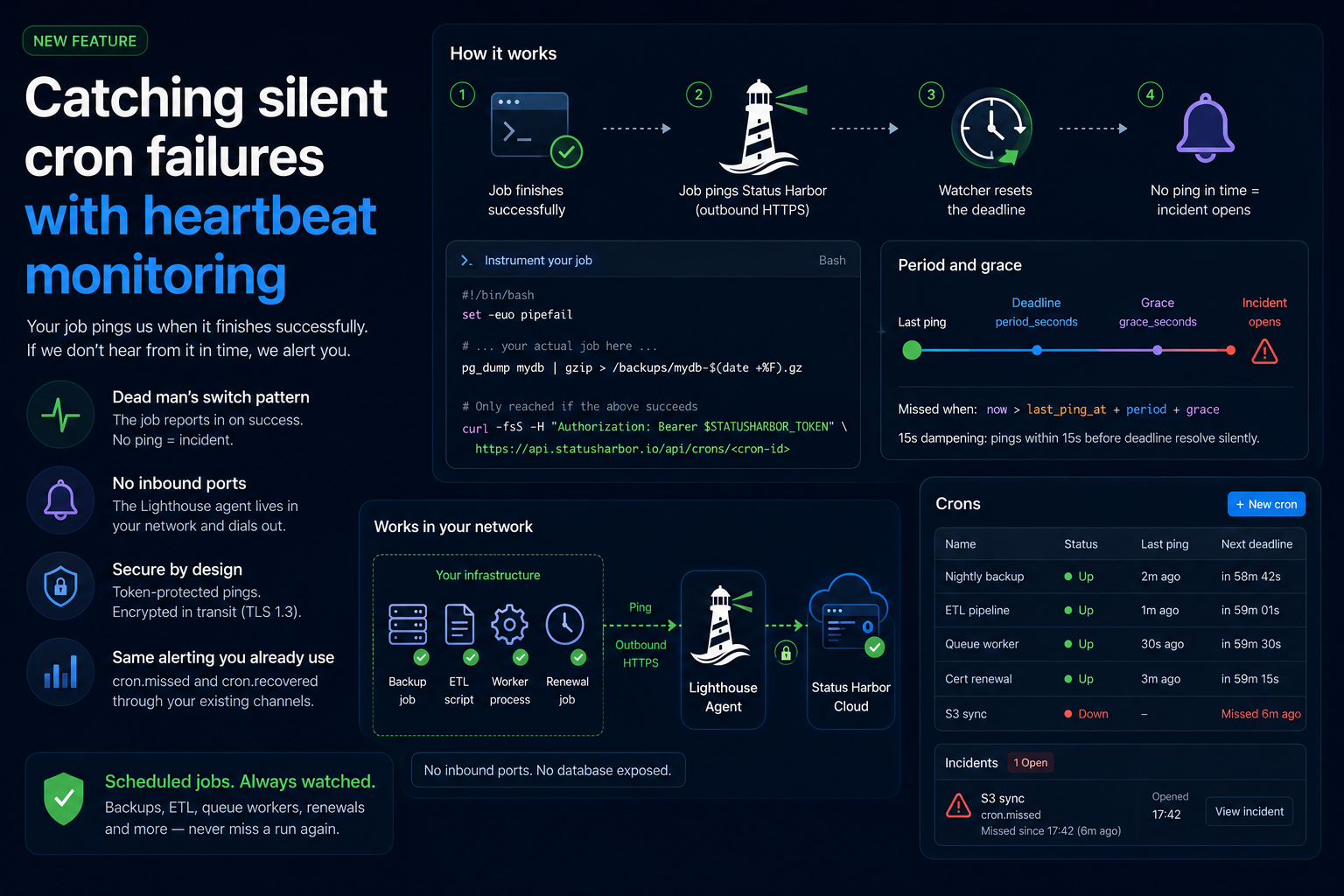
Catching silent cron failures with heartbeat monitoring
The backup nobody was watching
Six weeks ago your nightly backup job stopped running. Not with an error, not with a page, not with anything - it just stopped. The crontab entry is still there. The script still exists. But somewhere a permission changed or a disk filled or a dependency broke and the job exited non-zero and wrote nothing. You found out today because you actually need the backup.
This is the shape of most scheduled-job failures. The job is internal, not reachable from outside your network. Nobody is polling it. The only signal that something went wrong is the absence of output and absence is invisible when you are not looking for it.
Nightly backups, ETL pipelines, queue workers, certificate renewals - these share the same failure mode. They are fire-and-forget by design. When they work, nothing happens and that is fine. When they break, also nothing happens and that is the problem.
Why you cannot just poll from outside
The obvious answer is to check the job from outside: hit an endpoint every night and see if it responds. That works for a long-running HTTP service. It does not work for a job that runs for four minutes at 2am and then exits. There is no port open between runs. There is nothing to poll.
Even if you watched for side effects - a file being modified, a row being inserted - you are now maintaining a bespoke check for every job and you still have to decide what "not modified" means when the job runs twice in one night versus zero times.
The pattern that actually works inverts the check.
The dead man's switch pattern
Instead of an external system checking whether the job ran, the job reports in when it finishes successfully. A watcher sets a deadline: "I expect a ping from this job within the next N seconds." If the ping does not arrive by the deadline, an incident opens.
This is called a dead man's switch or a heartbeat check. The logic is:
- Job finishes successfully.
- Job pings the watcher.
- Watcher resets the deadline clock.
- If the clock expires before the next ping, the watcher alerts.
 SUCCESS PATH
   job done ──ping──▶ watcher ──resets──▶ deadline pushed forward
                                              │
                                              ▼
                                     silence stays "healthy"

 FAILURE PATH
   job crashes ──✗ no ping──▶ deadline expires ──▶ cron.missed ──▶ incident
Two things make this pattern reliable. First, the ping only fires on success. A job that exits non-zero, times out or crashes never sends the ping, so the watcher catches it automatically. Second, the watcher is entirely passive between pings - no polling, no network access to your infrastructure, no special permissions required on your side.
Instrumenting a job
The instrumentation is a single curl at the end of a successful run. The key word is end: if you ping at the start of a job, a job that runs but fails will still ping. Ping only after the work is done and verified.
#!/bin/bash
set -euo pipefail

# ... your actual job here ...
pg_dump mydb | gzip > /backups/mydb-$(date +%F).gz

# Only reached if the above succeeds
curl -fsS -H "Authorization: Bearer $STATUSHARBOR_TOKEN" \
  https://api.statusharbor.io/api/crons/<cron-id>
The set -euo pipefail at the top makes bash exit on any error, so the curl line is unreachable if the dump fails. Without strict error handling you need to be more careful - explicitly check exit codes before curling.
In Status Harbor, you create a cron check under Crons -> New cron in the dashboard. Give it a name, set the expected period (how often the job runs) and a grace period (how much extra time to allow before marking it down). Status Harbor returns a unique ping URL and you drop it into your job.
The token in $STATUSHARBOR_TOKEN is an API token with account scope, minted under Settings -> API Tokens.
Tuning period and grace
period_seconds is the expected interval between pings. The minimum is 60 seconds. grace_seconds is the extra buffer after the deadline before Status Harbor fires a cron.missed event and opens an incident. The default grace is 300 seconds (five minutes).
A cron is marked down when now > last_ping_at + period + grace. The scheduler ticks every 30 seconds. There is also a 15-second dampening window: pings that arrive within 15 seconds of the deadline resolve the implicit miss silently, without paging anyone.
The cliff-edge pitfall
The most common tuning mistake is setting your job's run interval exactly equal to period_seconds. Say your job runs every 60 seconds and you set period_seconds = 60. Any small delay - a network blip, a garbage collection pause, an NTP slew - pushes the actual gap past period + grace and fires a MISSED alert. The job recovers seconds later when the next ping lands, so you get a flapping alert that looks like a ghost.
This is not theoretical. A 60-second job on a 60-second period will flap. Bumping the job interval to 61 seconds stops it.
 period = 60s, grace = 0  (no slack)
   ping                        deadline
    │◀─────────── 60s ─────────▶│
    ▼                           ▼
 ───●───────────────────────────┼──────────▶ time
                                 ╲
                        next ping lands at 61s
                        → 1s late → MISSED (flap)

 period = 60s, grace = 120s  (honest buffer)
   ping                        deadline
    │◀─────────── 60s ─────────▶│◀──── 120s ────▶│
    ▼                                             ▼
 ───●─────────────────────────────────────────────┼──▶ time
              ╲
      next ping at 61s → well inside grace → healthy
Two ways to build in real slack:
-
Run the job slightly faster than
period_seconds. If the period is 60 seconds, ping every 50 to 55 seconds. Each successful cycle pushes the server's deadline forward relative to your schedule, so the buffer grows over time instead of sitting at zero. -
Set
grace_secondsto cover your worst-case delay. If your host occasionally pauses for 30 to 60 seconds under load, set grace to 60 to 120 seconds. Grace is not laziness - it is an honest model of how long your infrastructure takes under real conditions.
Both fixes together give you a system that absorbs ordinary operational noise without silencing real failures.
Gotchas
Ping at the end, on success only. Pinging at the start of a job tells you the job started, not that it finished. A job that starts and then hangs will look healthy. Use set -euo pipefail or explicit exit-code checks so the curl only runs when the work is done.
Use a token. Without a bearer token, anyone who guesses or obtains the cron ID can ping it and mark your job as healthy when it is not. Bind a token at create time. Status Harbor rejects pings with the wrong token.
Sub-minute jobs need a different approach. The minimum period_seconds is 60 seconds. If you have a job that runs every 10 or 20 seconds, use a regular HTTP monitor pointing at a /healthz endpoint on the process instead. A long-running process that exposes a health route is a better fit than a heartbeat check for that cadence.
Pending is not healthy. A new cron check starts in pending state and fires no alerts until it receives its first ping. If you create a check and then wait a week before wiring up the job, the check will not alert during that gap. Wire it up and send the first ping before you consider it operational.
How Status Harbor implements this
Status Harbor's cron heartbeat checks are a first-class monitor type, not a bolt-on. They route through the same notification system as HTTP and TCP monitors: cron.missed fires when the check transitions to down and cron.recovered fires when a missed check pings again. Recovery messages can be toggled per destination so you can suppress noise on channels where you only want to see open incidents.
States are straightforward: pending (created, never pinged), up (pings arriving on schedule) and down (missed beyond grace, incident open). A ping in any state moves the check back to up and resolves any open incident - including a manual ping if you need to clear state during maintenance.
  create           first ping         miss beyond grace
    │                   │                    │
    ▼                   ▼                    ▼
 ┌─────────┐  ping   ┌──────┐   miss   ┌──────────┐
 │ pending │────────▶│  up  │─────────▶│   down   │
 └─────────┘         └──────┘          └──────────┘
                        ▲                    │
                        └──────ping──────────┘
                       (any ping resolves the incident)
Cron checks are available on paid plans. Check statusharbor.io/pricing for current plan availability and caps. See statusharbor.io/docs/plans for per-plan limits.
The full setup reference is at statusharbor.io/docs/cron. If you have jobs that run on a schedule and are not yet watched, that is the place to start.
Frequently asked questions
What is a heartbeat check for cron jobs? A heartbeat check (also called a dead man's switch) inverts the usual monitoring direction. Instead of an external system polling your job, your job pings a watcher after each successful run. If the watcher does not hear from the job within the expected window, it opens an incident. This catches failures that produce no error output and no network activity - the most common way scheduled jobs fail silently.
Why can't I just monitor a cron job with a regular uptime check? Uptime checks work by polling an always-on endpoint. A cron job runs for a short window and then exits, leaving no port open to poll between runs. A heartbeat check handles this by listening for an outbound ping from the job itself rather than probing inward.
What happens if a cron job fails partway through?
If you use set -euo pipefail in bash, any failed command causes the script to exit before reaching the ping. The watcher never receives a ping, the deadline expires and an incident opens. For other languages and runtimes, the same principle applies: only call the ping endpoint after you have verified the work succeeded.
What is the minimum check period for cron heartbeat monitoring?
The minimum period_seconds in Status Harbor is 60 seconds. Jobs that run more frequently than once per minute are better served by a long-running process with a /healthz HTTP endpoint monitored by a standard uptime check.
How do I avoid false alerts from slow cron jobs?
Set grace_seconds to cover your worst-case run time and infrastructure delay. If your job occasionally takes 45 seconds longer under load, give yourself 60 to 90 seconds of grace. Also consider running the job slightly faster than period_seconds so each successful ping builds a small buffer rather than leaving the deadline at exactly zero slack.