Monitor services
behind your firewall
Run a single Lighthouse agent inside your private network and watch internal HTTP, TCP, UDP and SSL services from where they actually live. The same agent also streams CPU, memory, disk and network from the host it runs on, with threshold alerts in the same workspace. No inbound ports, no VPN, no firewall changes - just one outbound HTTPS connection back to Status Harbor.
What is a Lighthouse?
A Lighthouse is a small, static binary that runs anywhere you can run a Linux process - a VPC, a Kubernetes cluster, or a bare-metal server in a datacenter. It receives its check configuration from Status Harbor over outbound HTTPS, runs the checks against services on its own network, and streams state transitions back to your dashboard.
Because the agent only ever makes outbound HTTPS calls, you do not need to open inbound ports, set up a reverse tunnel or expose anything to the public internet. The same firewall rules that already let your services call out to the open web are enough for the agent to talk to Status Harbor.
Pair it with the cloud probes from our 3 public regions and one dashboard covers public-facing sites and the private services behind them.
Host and cluster metrics from the same agent
Uptime checks tell you whether your endpoint responds. They will not tell you that the host serving it is at 96% disk, that a node has been leaking memory for two days, or that an IOwait spike is about to turn into a five-minute timeout. The Lighthouse agent also samples CPU, memory, load, disk and per-interface network from the host it runs on, and ships them on the same outbound HTTPS connection it already uses for probes.
On Kubernetes, the optional DaemonSet flavour covers every node and surfaces per-node and per-PVC capacity plus cluster-wide CPU and memory aggregates. Pick a metric, comparator, threshold and duration; alerts fire into the same Slack, Telegram, email or webhook channel as your uptime alerts and close themselves when the metric clears.
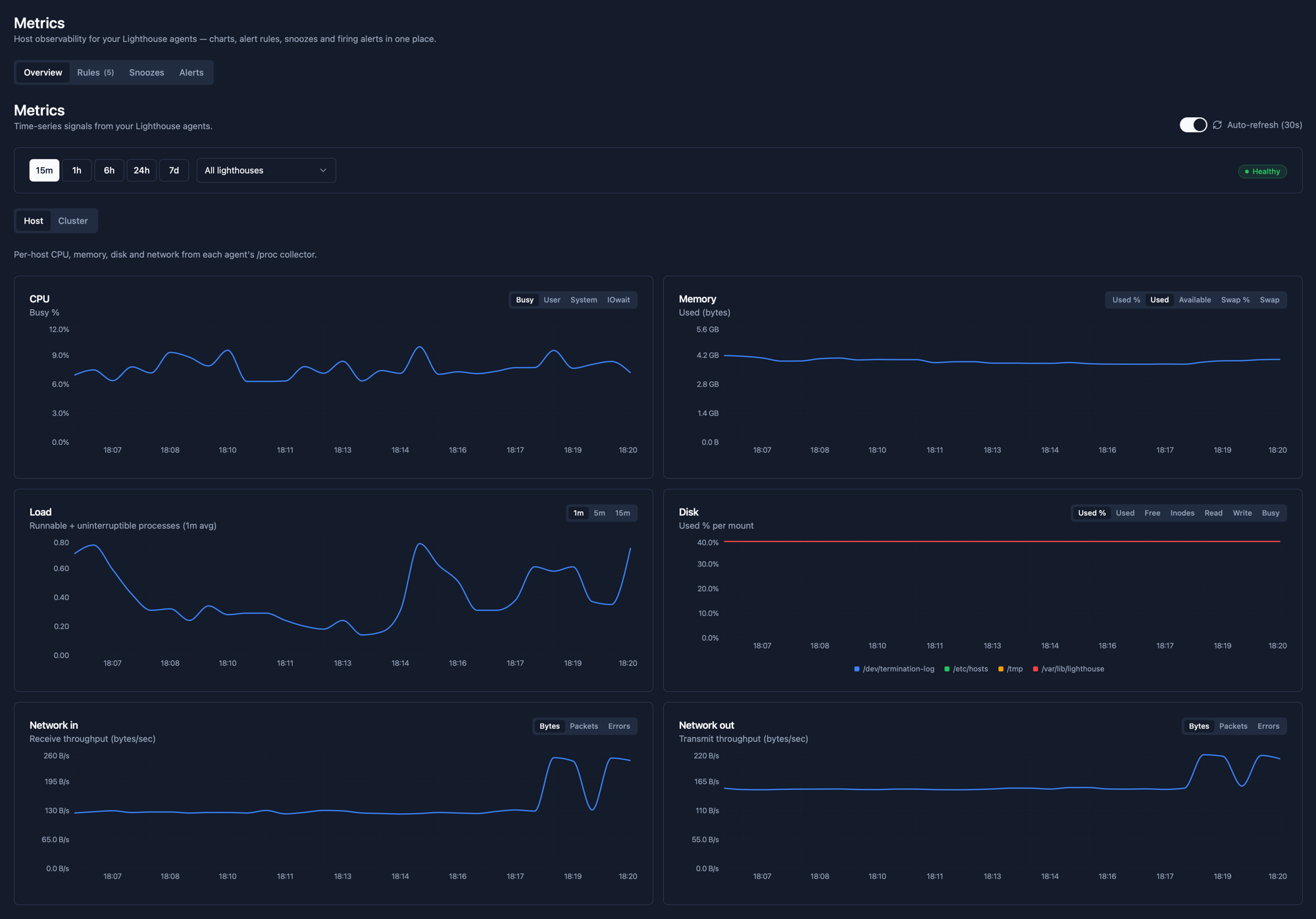
Five host-metric alert rules (CPU above 90%, disk above 85% and 95%, memory above 90% and 95%) are seeded into every new team so you have working thresholds on day one. Full details on the Host and cluster metrics page.
What a Lighthouse can probe
These check types cover almost everything you ship behind a private network.
| Protocol | Typical use | What we check |
|---|---|---|
| HTTP / HTTPS | Internal admin panels, private APIs, health endpoints behind a VPN or VPC | Status code, response body match, headers |
| TCP | Internal databases, message brokers, cache nodes, custom socket services | Connect success, handshake validity |
| UDP | Internal DNS resolvers, game servers, VoIP, custom UDP services | Packet send / response |
| SSL | TLS certificates on internal Ingresses, admin panels and mTLS endpoints | Days to expiry, expired or unreachable cert |
| DNS | Internal resolvers and in-cluster CoreDNS records | Record value match, drift detection |
Set up a Lighthouse in under five minutes
From mint-token to first check, no firewall changes required.
- 1
Create a Lighthouse
In Status Harbor, click + New Lighthouse, give it a name and copy the install command. The token is shown only once - store it the way you would any other secret.
- 2
Run the agent on a host inside your network
Paste the one-line install command on any Linux host that can already reach the services you want to monitor and the open internet. The agent runs as a single static binary - no runtime, no package manager, no dependencies.
- 3
Attach checks (or adopt the ones we discovered)
From the Status Harbor dashboard, point HTTP, TCP or UDP checks at the Lighthouse instead of a cloud region. On Kubernetes, the agent also surfaces every Ingress and externally-facing Service it sees as a one-click Discovery - adopt the ones you want to monitor, hide the rest. The agent picks new and adopted checks up on its next heartbeat - usually within seconds.
- 4
Get alerts where you already do
Failures from private checks alert through the same Slack, Telegram, email or webhook channels as your public monitors. One on-call surface for everything.
Auto-discovery on Kubernetes
On Kubernetes, the Helm install is the whole config. The agent watches Ingress and externally-facing Service resources in the namespaces you configure (every namespace by default) and surfaces them in your dashboard as one-click suggestions.
- Ingresses - every host+path the agent sees becomes an HTTP or HTTPS suggestion (scheme inferred from the Ingress's TLS block; you can override at adopt time).
- Services - LoadBalancer and NodePort services fan out one suggestion per port. Port name
http/httpsor numbers 80/443 classify as HTTP/HTTPS; everything else becomes TCP, UDP if the port is UDP. ClusterIP and headless services are skipped. - Hide what you don't want. The dashboard filters out hidden suggestions; nothing is monitored until you click Adopt.
- No surprises on billing. Discovered endpoints don't count against your monitor limit. Only adopted ones do.
Discovery is on by default for Helm installs. Disable with --set discovery.enabled=false, or scope to specific namespaces with --set 'discovery.namespaces={prod,staging}' (which downgrades the agent's RBAC from a ClusterRole to per-namespace Roles).
Designed for networks you don't want to open
- Outbound HTTPS only. The agent talks to Status Harbor on a single TLS connection it initiates. No listener, no inbound rule, no port-forward.
- Per-agent bearer token. Each Lighthouse gets its own token, scoped to that one agent and revocable from the dashboard. Lose a host, rotate the token, the old one is dead the moment you click revoke.
- Static binary, small surface. No runtime, no plugins, no auto-update. The binary you install is the binary that runs until you replace it.
- Only check metadata leaves your network. Status, latency, status code and the error string your service returns - nothing else. The agent does not exfiltrate response bodies, payloads or anything you didn't ask it to probe. See the Privacy Policy for the exact field-by-field list.
Common questions
Why do I need an agent for private network monitoring?
Cloud-based uptime checks come from public IP addresses. If the service you want to monitor is on a private subnet, behind a corporate VPN or only reachable from a Kubernetes cluster's internal DNS, no public probe can reach it. An agent solves this by running on a host that already lives on the right network - it can resolve the internal hostname and reach the internal port - and reports its results back over an outbound HTTPS connection that any standard egress policy already allows.
Where can I run the Lighthouse agent?
Anywhere you can run a Linux process. Common deployments include a small VM inside an AWS / GCP / Azure VPC, a pod in a Kubernetes cluster, or a bare-metal server in a colocation rack. The only requirement is outbound HTTPS to Status Harbor and reachability to whatever services you point it at.
Do I need to open ports or set up a VPN?
No. The agent only makes outbound HTTPS calls. There is no inbound listener, no port to expose and no tunnel to manage. If your network already lets the host reach the open internet on port 443, you have everything you need.
What happens if the agent loses connectivity?
The agent keeps running its local checks and buffers state transitions in memory. When the connection comes back, it ships the buffered events in order. If the agent stops sending heartbeats for longer than a short threshold, Status Harbor flags the Lighthouse itself as offline so you don't mistake "agent is dead" for "everything is healthy."
What data does the agent send back?
Per check, the agent reports: the new state ("up" or "down"), the previous state, response time in milliseconds, status code (for HTTP), the error string returned by the probe and a timestamp. It also streams host vitals (CPU, memory, load, disk usage per mount, network counters per interface) and, on Kubernetes, per-node and per-PVC capacity. Per agent, it reports its version, hostname and a periodic heartbeat. Response bodies, request payloads and anything beyond the keyword or header rules you explicitly configured stay on your network. The full list is in the Privacy Policy.
Does the same agent send host metrics?
Yes. Every Lighthouse agent samples CPU, memory, load, per-mount disk and per-interface network from the host it runs on and ships them on the same outbound HTTPS connection it already uses for probe results. On Kubernetes, the DaemonSet flavour adds per-node coverage plus per-PVC capacity and cluster aggregates. Threshold alerts use the same Slack, Telegram, email and webhook channels as your uptime alerts. See Host and cluster metrics for the full picture.
How long is metric history kept?
Metric chart history is kept for 7 days for every team. Firing alerts and their resolution timestamps are kept independently in the alerts timeline, so the record of what fired and when is retained beyond the chart window.
How many Lighthouses can I run?
Lighthouses are available on paid plans, with a per-plan cap. Most teams run one per network - one in a production VPC, one in a staging VPC and a third in an on-prem datacenter is a typical shape. Check the pricing page for the exact cap on your plan.
Watch your private services in minutes
One static binary, an outbound HTTPS connection, and the same alerting you already use.
Start freeRelated
- Host and cluster metrics - CPU, memory, disk and network from every host the agent runs on, with threshold alerts in the same workspace.
- Kubernetes monitoring for clusters, Ingresses and Services - drop the agent into a cluster and auto-discover endpoints.
- On-prem and private cloud monitoring - watch datacenter systems cloud-only tools can't reach.
- SSL certificate monitoring - catch expiry on certificates behind the firewall.